PresenceDesk brings daily availability and leave coordination into Google Chat. Teammates check in as Office, Remote or Out, while managers review time-off requests in a private browser workspace. Keep the team’s availability easy to find when planning meetings, office days and cover.
14-day trial for up to 100 enabled members. No payment card required.
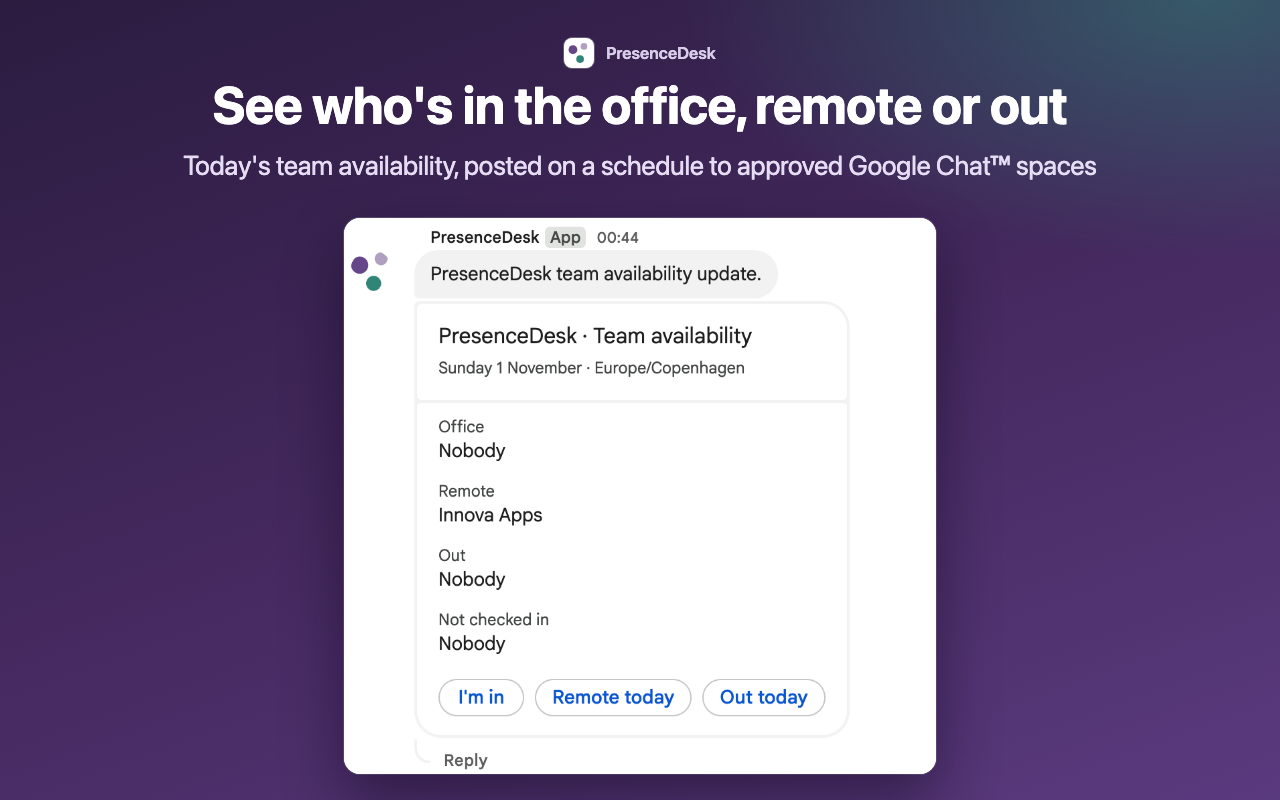
A scheduled availability update in an approved Google Chat space, shown with a demonstration workspace.
What you can do with PresenceDesk
A clear daily availability board
Use /in, /remote or /out to set your status, then /whosout to see the team board. The browser workspace brings today’s Office, Remote and Out counts together and helps you find a teammate. Command replies are visible only to the person using them.
Private time-off requests
Request leave in the browser workspace and let a team manager approve or decline it. Your leave category and note are visible only to you and your team’s managers. Shared availability stays simple, and managers need another manager to review their own leave.
Updates where your team works
Managers can enable scheduled team summaries in approved Chat spaces and private reminders for members. Subscribe to a private, revocable calendar feed or download a CSV of generic team availability. A workspace supports up to ten approved Chat spaces; schedules start switched off.
How to get started
Install and create your workspace
Install from Google Workspace Marketplace and open PresenceDesk in a personal Google Chat. Choose Create workspace, or Request access if a colleague has already created your organization’s workspace. The creator becomes its first manager.
Approve your team and start checking in
A manager approves membership requests. Members can then use Chat commands or open the browser workspace through a one-use sign-in link from PresenceDesk. Use the workspace to request leave and review decisions.
Choose where updates appear
A manager adds PresenceDesk to a team Chat space to approve it, then selects destinations and enables schedules in workspace settings. Members can pause personal notifications and revoke their own calendar feed.
Start with a 14-day trial for up to 100 enabled members, with no card and no automatic charge at expiry. Continued new activity requires a paid plan; there is no permanent free plan. All tiers have the same features.
Starter: up to 25 enabled members — USD 19 monthly or USD 190 yearly.
Team: up to 100 enabled members — USD 50 monthly or USD 390 yearly.
Business: up to 250 enabled members — USD 79 monthly or USD 790 yearly.
Prices cover one organization’s workspace. Yearly prices are the full annual charge. Purchased subscriptions renew until canceled.
Frequently asked questions
What happens when the trial ends?
Without a paid subscription, new check-ins, leave requests, approvals and scheduled messages pause. Existing data stays readable and exportable, and personal data deletion remains available. Trial expiry does not automatically charge you.
Does PresenceDesk change Google Calendar?
No. It provides a private calendar feed you can subscribe to and revoke. Your calendar app decides when to refresh that feed; PresenceDesk does not edit your Google Calendar.
Who can see leave details?
Only the requester and the team’s managers can see a leave category or note. The shared board, team updates and generic availability exports show availability rather than those private details.
Does it read Gmail or our organization’s directory?
No. PresenceDesk uses Google Chat interaction details to recognize members and keep workspaces separate. It does not read Gmail or access your organization’s directory. See the privacy policy for stored information and data controls.
Get started with PresenceDesk
Follow the setup guide, or contact Innova Apps if you need help choosing a plan or getting your team ready.
 Innova Apps