Give internal requests a clear owner and a place to follow progress. TicketThis turns Google Chat messages into tickets your support team can claim, assign, answer and resolve. It works with Google Workspace work or school accounts, with one shared desk for your organization.
Google Workspace work or school account required. Personal Gmail accounts are not supported. Start a 14-day free trial when you set up your desk; no card required.
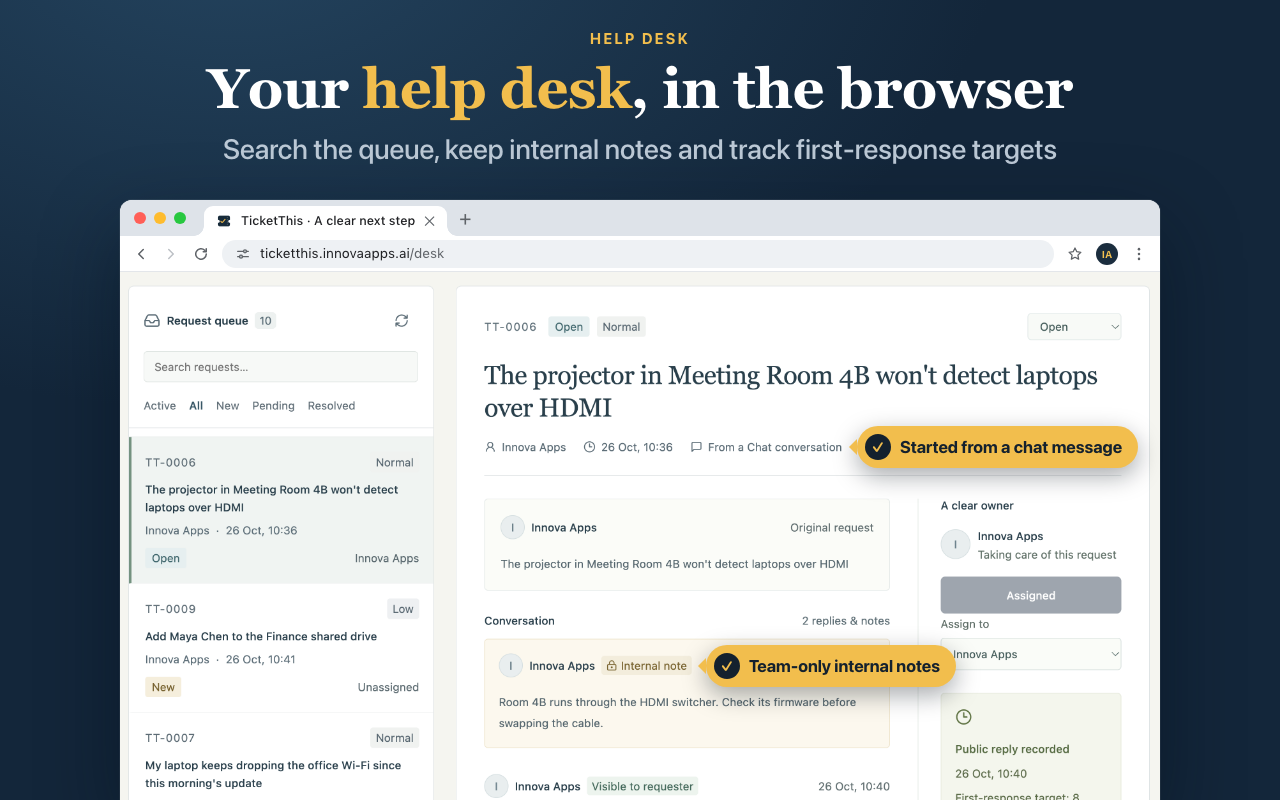
Use the browser desk to review requests, manage ownership and follow each ticket’s progress. Shown with demonstration tickets.
What you can do with TicketThis Help Desk
Turn a message into a request
Use /ticket to create a request, or choose Create ticket on a message in a space where TicketThis has been added. Colleagues can report a problem from the conversation where it came up, then find their requests in their personal Chat with TicketThis.
Make ownership and replies clear
Support agents can claim tickets, assign an owner, reply to the requester and update the status. Requesters see their own tickets and public replies. Internal notes stay with the support team, so agents can coordinate without adding those notes to the requester’s conversation.
Work through one shared queue
Open the browser desk to search and filter requests, inspect ticket history and export permitted tickets to CSV. First-response targets help highlight requests that need attention. These targets count elapsed time, including nights and weekends; they are tracking aids rather than guaranteed response times.
How to get started
Install and create your support space
Install TicketThis from Google Workspace Marketplace. Your Workspace administrator may need to allow the app. Create a named Google Chat space for the support team and leave external participants disabled. A group chat or a space allowing people outside your organization cannot be the agent space.
Add TicketThis and run /setup
Add the app to that space and run /setup. The first person to do this becomes the desk administrator, the space becomes your agent queue, and the organization’s 14-day free trial starts. Installation alone does not activate the desk.
Invite your agents and try a request
Keep the space limited to support staff. Each participant opens a personal Chat with TicketThis for personal notifications and browser access. Create a test request, assign it, send a reply and resolve it before introducing the desk to your colleagues.
Each organization gets one 14-day free trial with no card required. It begins when you run /setup. After the trial, one monthly subscription covers your organization’s desk, with no additional charge per agent or requester.
Charged in US dollars. The price excludes applicable tax; Google Workspace is a separate subscription.
Subscribing during the trial ends the trial and charges the first US$149 payment that day.
The desk administrator manages billing. Cancel anytime; access continues through the paid period.
Frequently asked questions
Can I use TicketThis with personal Gmail?
No. TicketThis requires a Google Workspace work or school account. If your organization restricts Chat apps, ask your Workspace administrator to allow it.
Who can see tickets and internal notes?
Requesters see their own tickets and public replies. Agents see the organization’s queue and internal notes. Everyone in the agent space can see its ticket cards, so only add support staff who should have that access.
Does TicketThis monitor every conversation?
No. A message becomes a ticket only when someone uses /ticket or Create ticket. The selected request text is copied into your desk and shared with the support team.
Can I include attachments or connect another help desk?
Attachment capture and synchronization with third-party help desks are not included. TicketThis also does not include business-hours calendars or separate queues for departments.
What happens when the trial ends?
Without a subscription, new requests, replies and ticket changes pause. Existing tickets remain available to view and export. Your administrator can subscribe from the browser desk to resume work; a subscription lapse does not delete the tickets.
Get started with TicketThis Help Desk
Follow the setup guide, or contact Innova Apps if you need help choosing a plan or getting your team ready.
 Innova Apps